

RocketKOR’s Identity Verification (IDV) service allows you to authenticate your Customers using KYC (Know Your Customer) and KYB (Know Your Business) standards. KYC and KYB checks are required by Anti-Money Laundering (AML) regulations to assess Customer risk and prevent fraud.
RocketKOR IDV can be used to verify Individual and Business Customer Accounts. Any Beneficial Owners attached to a Business Customer Account will also be verified as part of the IDV process. Currently only U.S. Customer Accounts can be verified using IDV.
Typical use cases for IDV include:
IDV can be used to evaluate Customers for a variety of use cases, such as creating a Customer Account, opening a bank account for a Customer, or issuing a card to a Customer.
Each IDV use case may have different requirements. For example, KYC checks are required for Individual Customers and KYB checks are required for Business Customers. Basic KYC/KYB checks are required to create a Customer Account, while more extensive checks are required to open a bank account or issue a card for a Customer.
RocketKOR uses IDV profiles to define the IDV rules and checks for a specific IDV use case. Each profile specifies the Customer Account fields, Customer identity documents, IDV rules, and KYC/KYB validations required for the use case.
IDV profiles allow you to quickly select the appropriate requirements when verifying a Customer Account, depending on the use case. For example, different IDV profiles may be used to:
Use the RocketKOR APIs or Portal to view the IDV profiles available for your Business Account.
Use the RocketKOR APIs or Portal to create and submit an IDV application for a Customer Account. RocketKOR sends the application to a trusted third-party IDV provider for processing and monitors the application status.
The following diagram shows the steps to verify an Individual or Business Customer using the IDV service.
Click Image to View Full Size
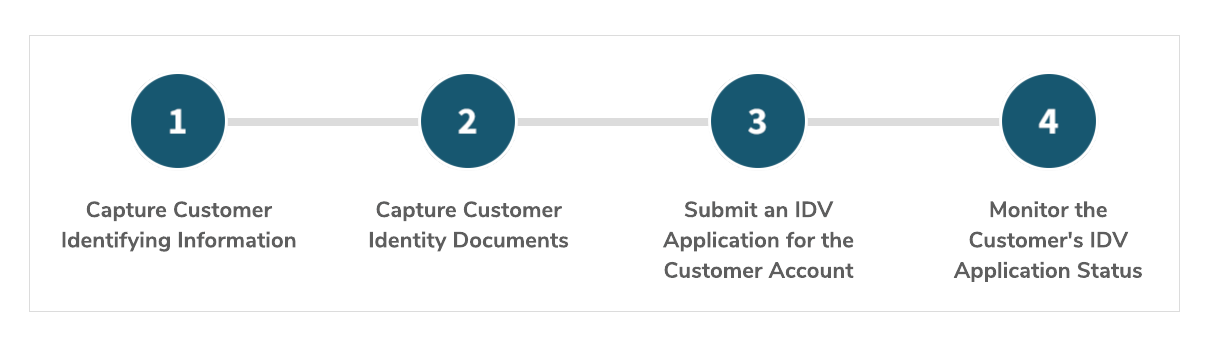
Identity Verification (IDV) Service Workflow
Ensure the Customer Account contains the required identifying information for the Customer. The required information is listed in the IDV profile that will be used to verify the Customer.
Some or all of the following information may be required.
Individual Customers | Business Customers |
|---|---|
|
|
The following information is required for any Beneficial Owners linked to a Business Customer Account.
Beneficial Owners |
|---|
|
Add any identity documents required to support the Customer’s identifying information. The required documents are listed in the IDV profile that will be used to verify the Customer.
For example, opening an account for an Individual Customer may require a driver’s license and passport, while opening an account for a Business Customer may require a business license.
Create an IDV application for the Customer. The application includes the Customer Account ID and the IDV profile that will be used to verify the Customer.
RocketKOR submits the application to a trusted third-party IDV provider, who will perform the requested KYC/KYB checks for the Customer and any related Beneficial Owners.
Note Multiple IDV applications can be submitted for a Customer Account. However, only one IDV application per IDV profile may be processed at a time for a Customer Account.
RocketKOR monitors the IDV application and tracks the application status. You can use the RocketKOR APIs or Portal to view:
Step into the future of Finance with RocketKOR! Simplify payments, banking, lending, and data analytics using our versatile KOR Platform.
A Rocket Financial Inc. company
@ 2024 RocketKOR, Inc. All rights reserved.


